

Good organization helps humans learn and algorithms parse information, making it core to an effective SEO strategy.
Topic clusters are groups of pages on a website organized around a central topic and linked together. It’s a concept that borders on obsession for many in the SEO industry. But a shiny new cluster plan might not be the SEO remedy your website needs, especially if you don’t have a prolific publishing engine to support it.
Creating some kind of content taxonomy is helpful for your readers, content marketers, and even Google’s crawlers. It helps readers seamlessly navigate to the next relevant post, content marketers create more effective strategy, and crawlers identify related content.
Clusters are one specific content tactic to rank informational pages for high-difficulty queries, and this might not fit your goals. Here’s what you’ll learn in this guide:
- What Is a Topic Cluster?
- How Topic Clusters Benefit SEO
- Who Should Use Topic Clusters?
- 4 Ways People Incorrectly Use the Topic Cluster Method
- Substitutes for Topic Clusters
- Clean Up Before You Cluster
What Is a Topic Cluster?
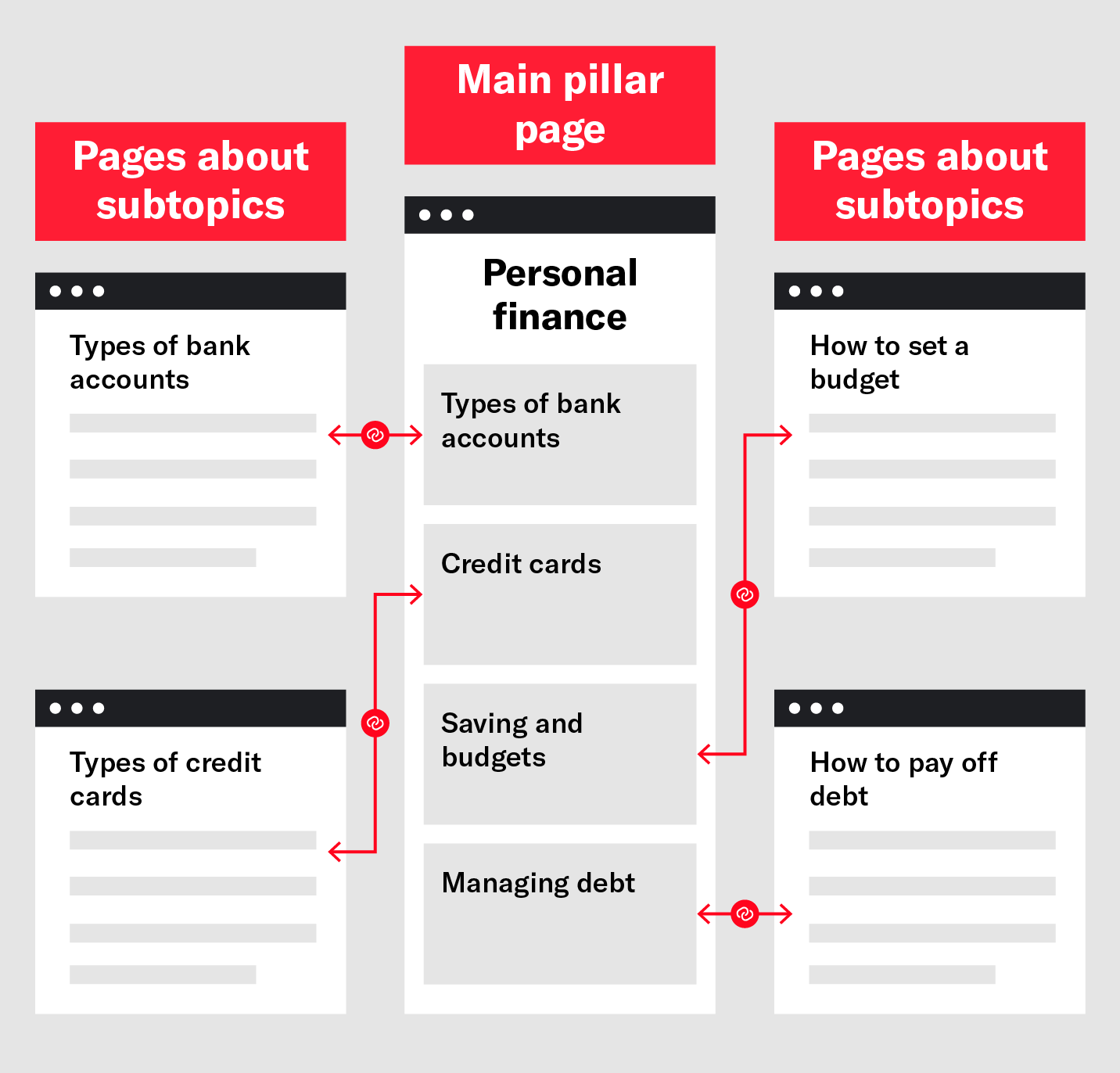
A topic cluster is a content taxonomy method that uses a single page (the “pillar”) acting as the hub for many posts (the “clusters”) around it. These pages are interlinked (meaning that they link to each other in both directions).
Topic clusters are also known as “hub and spoke” models. Whether you call it a pillar, a hub, or a cluster, the purpose is simple:
Take one central page and build its ranking potential by supporting it with related subpages.
How Topic Clusters Benefit SEO
HubSpot popularized the topic cluster model. As a publisher with a lot of content, clusters allowed their team to organize a massive library, help users navigate the website, and create a rising tide of impactful content to launch important pages into high Google rankings.
Clusters benefit SEO by:
- Organizing pages into logical groups encourages users to click multiple pages and spend more time on your website.
- Demonstrating breadth and depth of topic coverage to establish your website as authoritative and build E-E-A-T signals.
- Passing authority and link value between related pages generates positive ranking signals and lets pillar pages rank for competitive keywords.
- Building semantic relationships between pages and topics helps crawlers navigate and understand your website.
- Organizing a content library and making it easier to track and plan content.
Who Should Use Topic Clusters?
Topic clusters are great for large, publishing-focused websites that target competitive, broad keywords. If building a massive content library around top-funnel experiences doesn’t serve your business goals, clusters may not be a good fit.
Use the following table and examples to decide whether the model is right for you:
| Reasons to use topic clusters | Reasons to use a different model |
|---|---|
| Large content library (hundreds or thousands of pages) | Small, focused content library |
| Planning a significant increase in publishing cadence | Stable publishing cadence |
| Targeting broad, high-difficulty keywords | Targeting long-tail, niche, or purchase-intent keywords |
| Ranking top-funnel pages is core to business goals | Ranking landing or product pages is core to business goals |
The topic cluster works best for brands going for high volume, very broad keywords. For HubSpot, this method made perfect sense as their core topics are big picture, like “marketing” and “sales.” If your business is in a similar situation, the topic cluster is definitely a good fit. Some examples include:
- A home furnishing company setting up topic pillars on “decorating ideas” and “party ideas”
- A small business lender with pillars covering “small business” and “entrepreneurship”
- Siege Media with pillars covering “Digital PR” and “content marketing”
However, we sometimes find that clients bring us their new topic cluster idea — only to find that they’re forcing a model (popularized by a publishing powerhouse) to fit their more micro needs.
These are some reasons that topic clusters might not be a fit:
- You’re an e-commerce company and you need to rank product category pages.
The cluster model is designed to rank broad, often top-funnel informational pages. If you’re focused on bottom-funnel, sales-focused pages, topic clusters may be a misapplication of resources.
- You’re trying to rank for niche, long-tail keywords.
A cluster approach may not be necessary if you’re targeting high-intent keywords. Because cluster models are designed to rank in competitive search engine results pages (SERPs), they’re likely overkill. In addition, the cluster model is great for educational and browsing use cases. If you’re targeting users further down the funnel, clusters may not serve their needs.
- You serve a knowledgeable, discerning audience.
Let’s say you offer outsourced accounting services, your target audience is CFOs, and you’re trying to rank for “accounting outsourcing.” You probably don’t need to teach your audience about accounting fundamentals with top-funnel posts; that doesn’t address their business needs, or yours.
- Your team isn’t built for scaling content.
Clusters work best for teams with the capacity to create a lot of content. That kind of publishing requires standardized processes, a well-trained content team, and predictable outcomes. Some businesses simply don’t need this kind of publishing engine, and some aren’t ready for it yet.
4 Ways People Incorrectly Use the Topic Cluster Method
Before this comes off as a call to grab your pitchforks against HubSpot, I should clarify that topic cluster content strategy is a solid model. It’s just too often people adopt the new shiny thing because, hey, if HubSpot is doing it we all should do it, right? But that’s not the right mindset. HubSpot even shares in this article when their model isn’t a good fit:
“A good sniff test here is — if you’re trying to get the page you’re working on to rank for a long-tail keyword, it’s not a pillar page. If the page you’re working on explores a very narrow topic in great depth, it’s not a pillar page. If the page you’re working on touches on many aspects of a broad topic, it’s probably a pillar page.”
But that’s only one scenario. Here are some more ways the topic cluster model has been misused and some substitute frameworks to use instead:
1. Pillars Are Too Niche
Like HubSpot said, pillars should go after very broad terms. This means that the terms you target should be high level, high search volume, and high competition. If your pillar page targets long-tail or niche keywords, you’re not going to populate it with enough clusters (i.e., supporting content) to make it look robust enough.
For example, let’s say you’re customer service software Broadly. You already have a blog that’s updated weekly and you’re looking for a new blog architecture. If we were following the topic cluster model, an example pillar may be “customer feedback.” Seems broad enough, right?
But if you look at the long-tail keywords related to that potential pillar, you’ll find that volume drops off after five to 10 phrases like “customer feedback questions” and “customer feedback methods.” Even a vague keyword like “customer feedback” only has so many potential long-tail keywords after that.

So if you find yourself trying to make a niche keyword into a pillar opportunity, step back and reconsider if it really provides enough content opportunities. It might be better to write a handful of articles focused on those long-tail keywords instead.
2. Pillars Are Too Broad
I know — I just told you broad pillars are preferred. But there is a scenario where a pillar that’s too broad requires supporting content that’s not a good fit for your brand. In order to cover all the potential content clusters under the pillar, you’re risking spending a lot of time writing topics that aren’t close to your product or service.
For example, if you’re an automation company like Zapier, your brand promise is increased productivity through automating daily tasks like email, messaging and more. So a natural broad keyword may be “productivity.” In fact, Zapier has a productivity tab on their current blog.
Zapier probably didn’t create this category in their blog design with the topic cluster model in mind. Attempting to rank for “productivity” isn’t the right mindset with this pillar — and I doubt that was their intention.
The keyword “productivity,” if you Google it, doesn’t match to Zapier’s core business model. You’ll see a lot around productivity at work, but it focuses on a variety of methods like time management, healthy habits and more. Unless Zapier wants to dedicate a good portion of their publishing to these other productivity points, ranking shouldn’t be a core goal.

Broad topics are best for pillars, but consider the resources you’ll also have to dedicate to populate that pillar. If too many resources are going toward off-brand or low-value keywords, it’s not the right pillar.
3. Pillars Have Too Much Overlap
Most companies don’t solve a myriad of problems. They focus on a specific industry and serve a niche need. Some clients have come to us with a list of pillar ideas that are way too similar, despite maybe having different search volume or SERPs.
Google is getting smarter and smarter at making connections. Even if today the SERP between “moving companies” and “moving” are slightly different, have the same search intent and Google is serving us very similar results. So if I’m a self storage company, there’s no reason to create two pillars for each of these broad terms.
Overlapping pillars also create a duplicate content concern that the original topic cluster model helps to avoid. If your pillars are too similar, your internal discussion will be consumed with if topic X is a better fit under pillar Y or Z. That’s not the best use of your content planning meeting time.
4. Pillars Are Competing With Product Pages
The final error I see with pillar page creation is the potential to create competition with your product pages. It’s smart to build pillars that are on-brand and close to product, but if they’re too close, you risk confusing Google.

An example of this can be found on Blue Buffalo’s website. They have a main e-commerce nav at the top with navigation to their blog nestled under that. One potential obstacle could be their “Dry Dog Food” and “Wet Dog Food” pages competing with dog nutrition topics. We might recommend deoptimizing the pillar anchor text to create a “Health” category on the blog to replace the current “Nutrition” category.
Sometimes a simple anchor text or URL change is all you need, but be aware of these potential overlaps when formulating your navigation.
Substitutes for Topic Clusters
Even if the topic cluster model isn’t the right fit for your content strategy, it doesn’t mean you’re stuck with a generic blog. There are ways you can manage your existing site content and reap the same SEO benefits.
1. Blog Categories and Subcategories

Category and topic labels went by the wayside after too many SEOs abused them for keyword stuffing, which in turn has left many blogs without any kind of uniform structure. But I still stand by them! If used correctly, like the Buzzstream blog, you can succinctly call out your top categories at the top. You’re still getting some nice anchor text on the page to show the semantic relationship of your blog content, without having to build out a multi-level framework.
2. Content Format Driven Hubs
Different naming conventions for certain “hubs” is a great substitute. Some companies opt to name their hubs after different content formats (for example, an “eBooks” hub, a “Resources” hub and a “Whitepapers” hub). I find this method to be lacking. Even if keywords aren’t the priority, it makes your nav look no different from your competition.

Instead, explore content hubs that have broad keyword value and can make your nav stand out from the competition. Kitchen Cabinet Kings is a good example of this. You can see the thought put into their naming convention (“Cabinet Styles”) compared to RTA Cabinet Store’s drop-down, which is much more generic (“Files”).

3. Linking Priority Content in Header or Footer
If your industry is niche enough, you probably only have a handful of content that drives the most relevant traffic. Some are obvious, like a FAQ or Tutorials page, but other experiences like a long form guide or microsite also apply here.

Zapier’s footer is a perfect example of linking to high-value content, where you’ll see their “Best Content” on product-relevant topics specifically called out and linked to.
Clean Up Before You Cluster
Before you cluster (or do one of the alternatives), I highly recommend reading our post on content auditing. If you’re reworking your entire content library’s information architecture (IA), this is the perfect time to take full stock of your existing content.
This can inform your chosen model based on what you’ve already written. Additionally, you’re removing low performers, which ensures your new blog gets the fresh start it deserves.
If you’re looking to overhaul your content architecture, there are so many routes out there! The best path for one site may not be the best solution for yours. So take your time and map out an IA or get some help from content marketing professionals to achieve the results you want.